Getting Started: What to Prepare Before Using Your Swann Security System
Last updated:
Before setting up your Swann Security system, make sure you have the necessary equipment ready. The items you'll need depend on whether you're installing a recorder, a hub, a base station, or a standalone Wi-Fi camera.
Before you proceed, choose what system you have:
Things to Prepare Before Setup
Depending on your recorder model, you may need:
For DVRs, NVRs, and AdvancedX™ system
- A monitor or TV
- HDMI cable (recommended) or VGA cable
- USB mouse
- Power adapter
- Ethernet cable (recommended for internet connection)
- Cameras (optional during initial setup)
- Storage device (if your recorder does not include one)
For SecureAlert™ or AllSecure system
- A monitor or TV
- HDMI cable (recommended)
- USB mouse
- Power adapter
- Ethernet cable (recommended for internet connection)
- Wi-Fi name (SSID) and password (for Wi-Fi capable devices)
- Cameras (optional during initial setup)
- Storage device (hard drive or microSD card if supported)
For MaxRanger4K™ Power Hub (NVW-MR4K) and EliteX™ system
- For offline setup:
- A monitor or TV
- HDMI cable (recommended)
- USB mouse
- Power adapter
- Cameras (optional during initial setup)
- Storage device (hard drive or microSD card if supported)
- For online setup:
- Power adapter
- Ethernet cable (recommended for internet connection)
- Cameras (optional during initial setup)
- Storage device (hard drive or microSD card if supported)
For MaxRanger4K™ Base Station (NVW-MR4KSTN)
- Power adapter
- Ethernet cable (recommended for internet connection) or Wi-Fi name (SSID) and password
- Cameras (optional during initial setup)
- Storage device (hard drive or microSD card if supported)
For standalone cameras
- Power adapter (for AC-powered cameras)
- Charge the camera (for battery-powered cameras)
- Wi-Fi name (SSID) and password
- Storage device (microSD card if supported)
Frequently Asked Questions Before Setting Up Your Swann Security System
How do I start my Swann device?
Power on the device after connecting the required accessories.
For recorders and hubs, connect the display (if required), USB mouse, optional network cable, cameras, and storage before connecting power.
For app-based devices such as the MaxRanger4K™ Base Station and standalone Wi-Fi cameras, power on the device and follow the pairing instructions in the Swann Security app.
Do I need an internet connection?
-
DVRs, NVRs, AdvancedX™, SecureAlert™, or AllSecure systems can be used without internet for local viewing and recording. Internet is only needed for features like remote viewing, notifications, and app access.
See also: -
MaxRanger4K™ Power Hun (NVW-MR4K) or EliteX™ system can be used offline with a monitor and USB mouse.
However, connecting it to your router using an Ethernet cable is the recommended setup because it makes pairing with the Swann Security app quicker and more convenient.
See also: -
MaxRanger4K™ Base Station requires an internet connection. You can connect it using an Ethernet cable or Wi-Fi.
Learn how to pair your Base Station to Swann Security app here -
Standalone cameras require a Wi-Fi connection during setup because they are managed through the Swann Security app.
Learn how to pair your standalone camera to Swann Security app here
Pro Tip: Protect Your Login Credentials
If you have paired your recorder to Swann Security app, we highly encourage to do the following right away:
- Store Your Password Safely: Please write down your password and keep it in a secure, accessible location to avoid login disruptions.
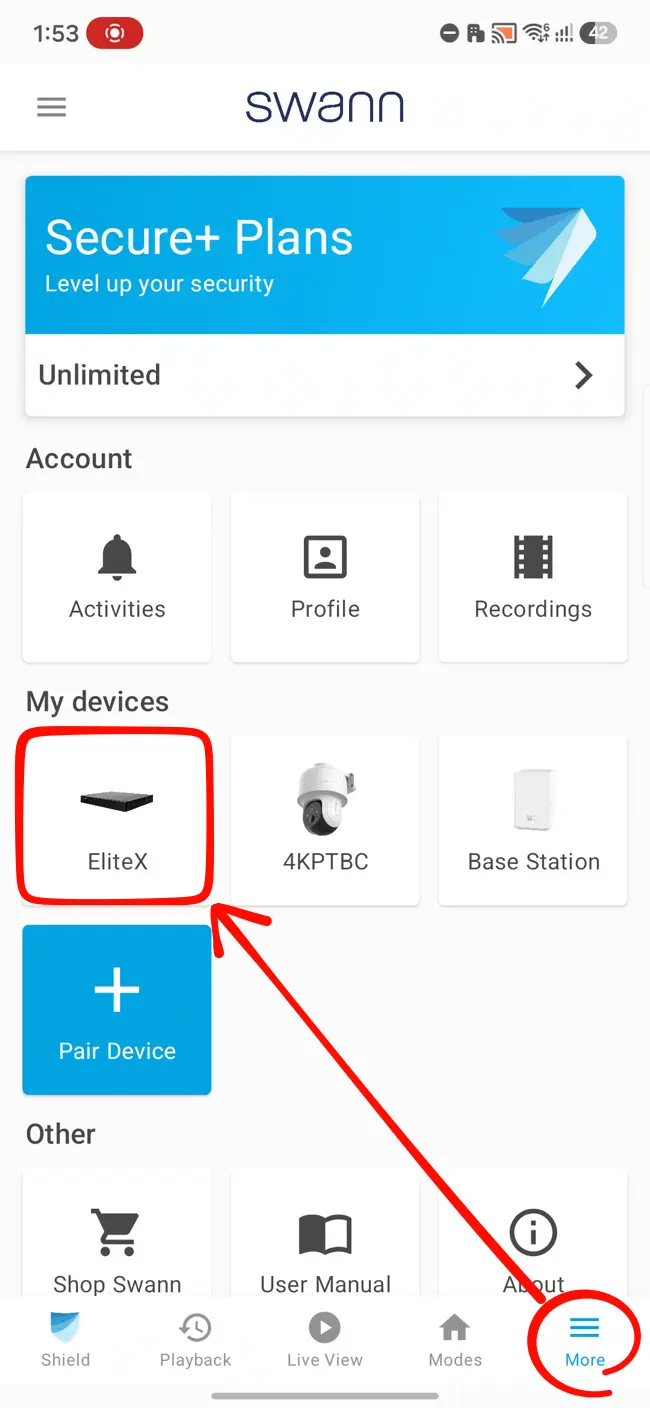
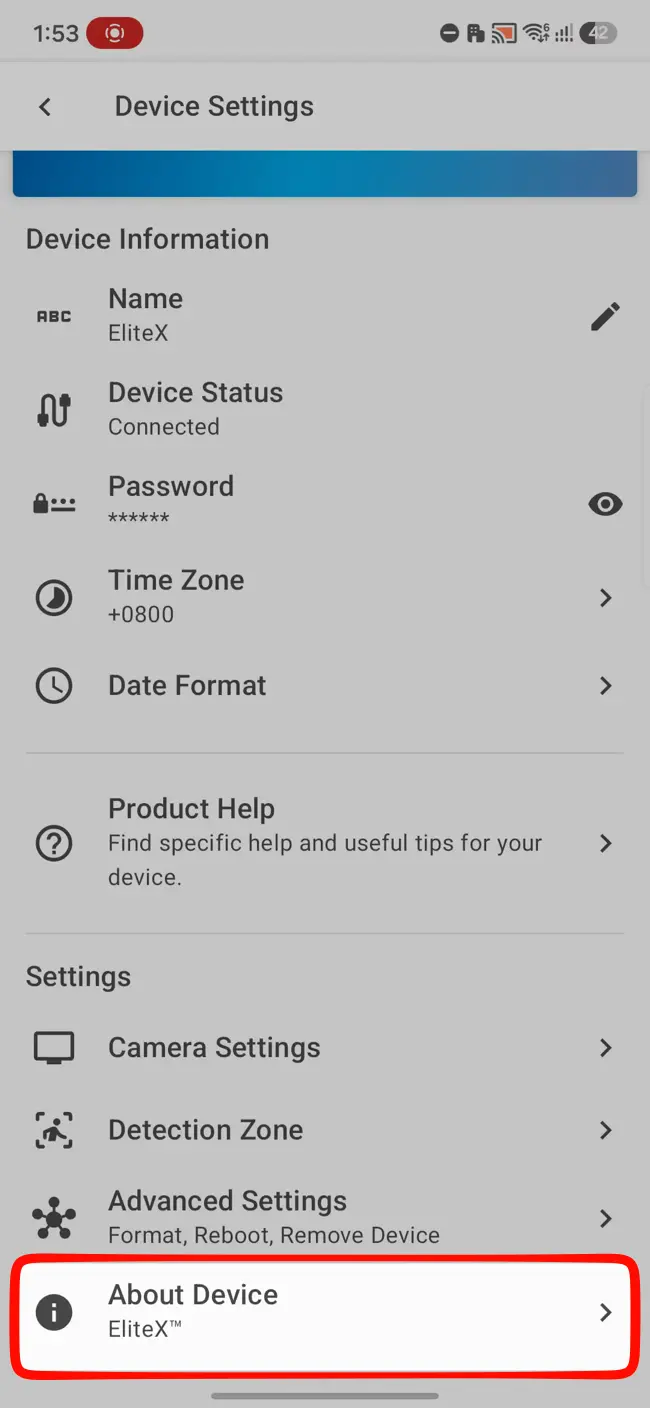
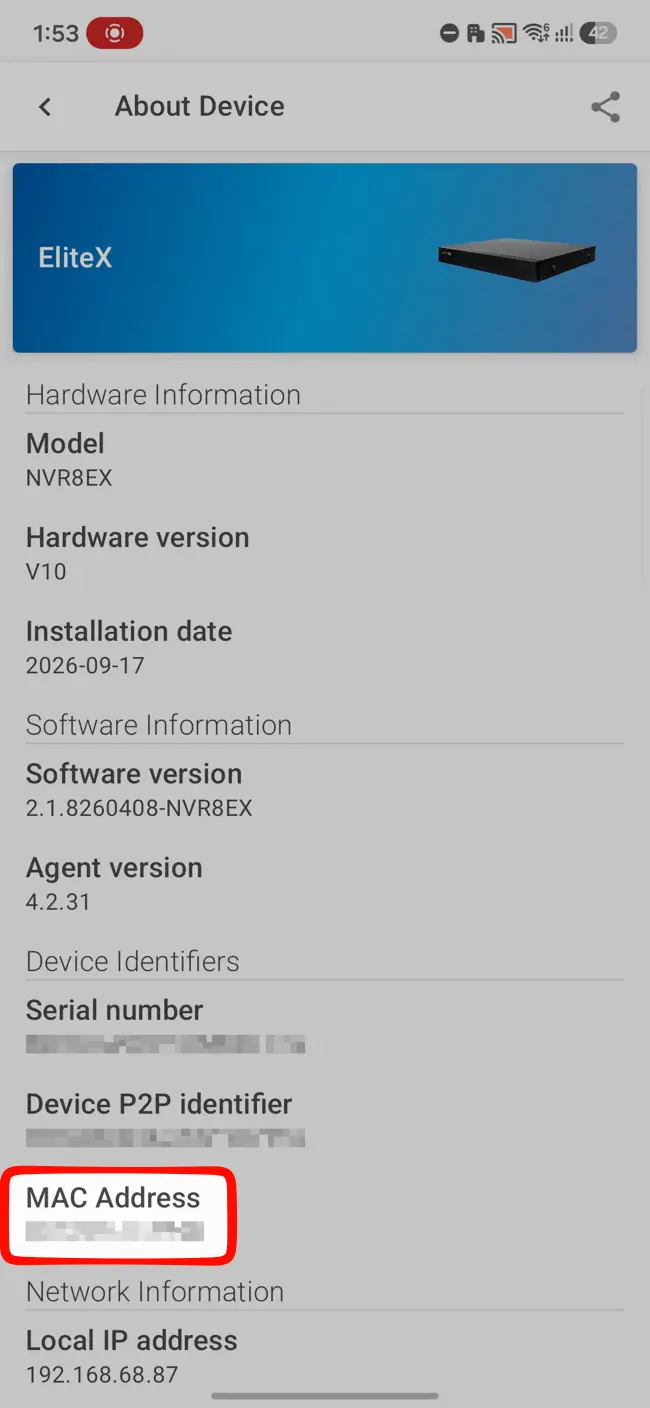
- Save Your MAC Address: Upon pairing to your Swann Security account, go to your recorder's settings and note its MAC Address. You will need this address as your Recovery Code if you ever require a password reset.
- Tap
- Select your device
- Tap About Device Android / Technical Details iOS
Do I need storage before my system can record?
Yes, if your device does not already include storage.
Some Swann recorders, hubs, and cameras are sold without a hard drive or microSD card. The device can still display live video and complete setup, but it will not record video until compatible storage is installed.
Check your product specifications to confirm whether storage is included.
Why Preparing Your System Matters
Preparing everything before you begin makes installation faster and helps prevent common setup issues such as no video output, recording not working, or pairing problems. Knowing which accessories are required for your specific device also helps ensure you have everything needed before starting.
Related Questions
Can I use my Swann system without the app or software?
DVRs, NVRs, AdvancedX™, EliteX™, NVW systems, and the MaxRanger4K™ Power Hub can be used locally without the app or software. The MaxRanger4K™ Base Station and standalone Wi-Fi cameras require the Swann Security app.
Can I use Wi-Fi instead of Ethernet?
This depends on your device. The SecureAlert™, AllSecure, and MaxRanger4K™ Base Station supports both Ethernet and Wi-Fi, while the DVRs, NVRs, and MaxRanger4K™ Power Hub use Ethernet for network connectivity.
For recorder's with no built-in Wi-Fi, check our Compatibility Hub if it is capable of using our USB Wi-Fi Antenna.
Can I add storage later?
Yes. If your device supports local storage, you can install it later before enabling recording.
Can I connect cameras after setup?
Yes. Most Swann recorders allow cameras to be connected or paired after the initial setup.
Summary
Before setting up your Swann security system, identify your device type and prepare the required accessories, network connection, display (if needed), and storage. Once everything is ready, you can proceed with the setup process and start protecting your property.